

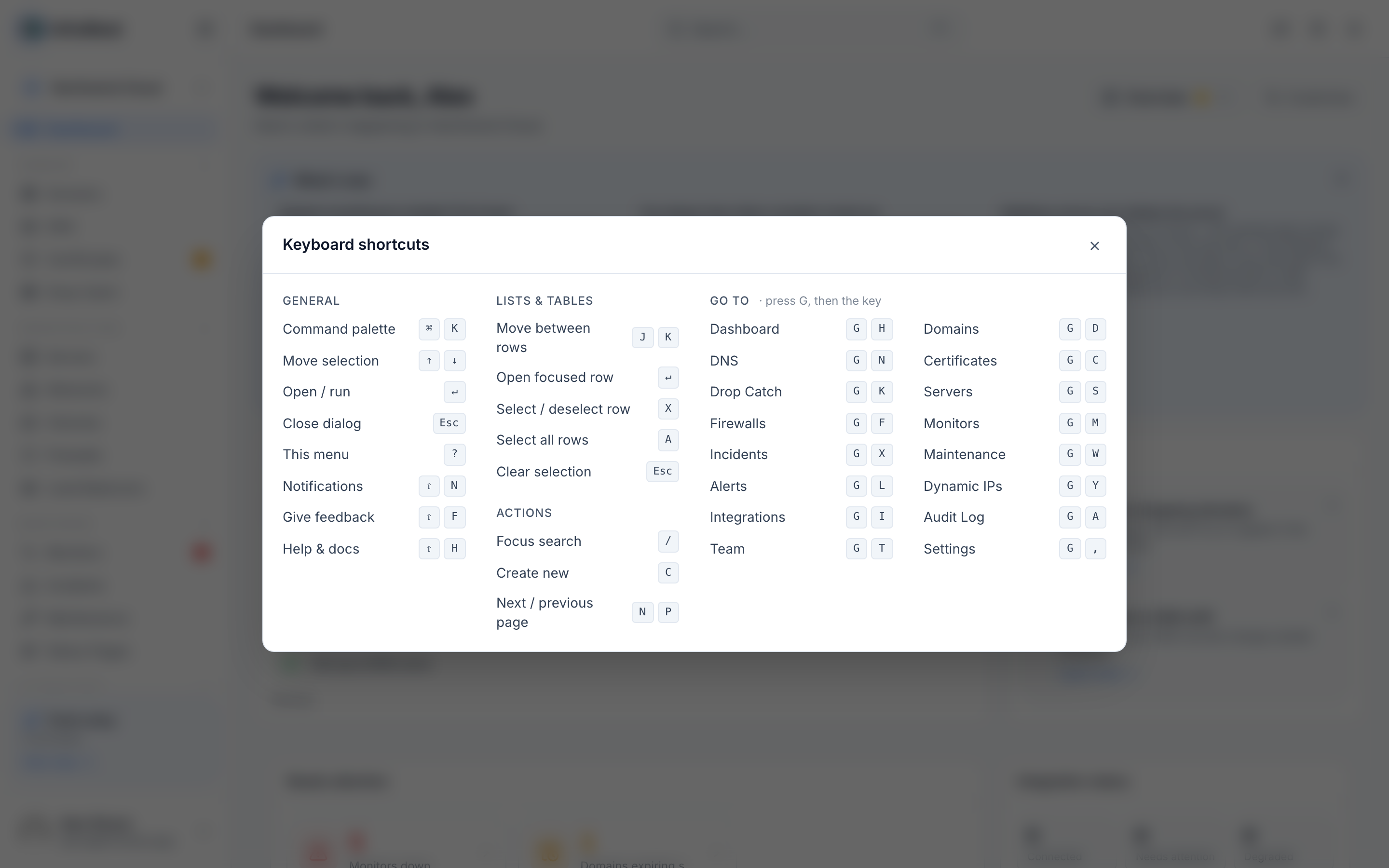
Keyboard shortcuts let you move around InfraNest and get things done without touching the mouse, which is handy if you manage a lot of infrastructure and want to move fast.
Overview
- Almost every part of InfraNest can be reached or controlled from the keyboard.
- Shortcuts are grouped by what they do: navigation, lists and tables, and jumping to a section.
- A built-in cheatsheet always shows the full, current list.
See every shortcut
- Press ? anywhere in the app, except while you're typing in a field.
- The shortcuts cheatsheet opens, listing every shortcut grouped by what it does.
The ones you'll use most
- ⌘K / Ctrl+K — open the command menu to jump to any page or search help.
- ? — open the shortcuts cheatsheet.
- ⇧N — open your Notifications.
- ⇧H — open the help panel.
- ⇧F — send feedback.
- Esc — close whatever's open.
Use shortcuts in lists and tables
- Press J or K to move down and up the rows.
- Press ↵ to open the highlighted row.
- Press X to select it, or A to select all rows.
- Press Esc to clear your selection.
- Press / to jump straight to the search box.
- Press C to create a new item.
- Press N or P to go to the next or previous page.
Jump to a section
- Press G, then a letter for the section you want.
- For example, press G then D to go to Domains, G then S for Servers, or G then H for the dashboard.
TipThe cheatsheet (press ?) lists every "go to" letter, so you don't need to memorize them all.
Was this article helpful?
Related articles
Getting helpHelp is built into InfraNest — you can read guidance for whatever page you're on without leaving it.Getting started with InfraNestWelcome to InfraNest. When you sign up, a short setup wizard gets your workspace ready, and your dashboard then guides you through the first few things to do.Search and jump aroundInfraNest has a quick command menu so you can jump to any page or find help without clicking through the menus.Contact support and follow a ticketAsk us a question from inside InfraNest and follow the reply in the same place — no email thread to lose.